






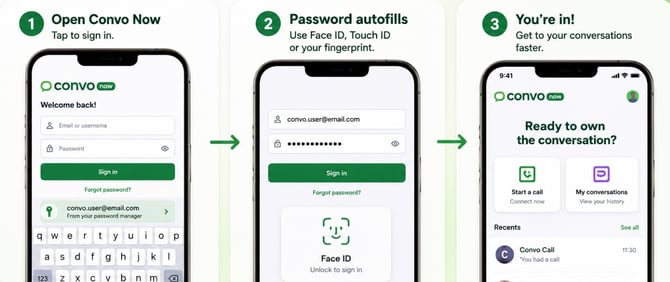
You can now use your phone's built-in password manager to automatically fill in your username and password.
What is password autofill?
Password autofill allows your device to securely save your login details and automatically enter them the next time you sign in to Convo Now.
Supported password managers include:
- iCloud Keychain (iPhone and iPad)
- Google Password Manager (Android)
- 1Password and other compatible password managers
- Update to the latest version of Convo Now.
- Sign in using your username and password.
- When prompted, choose Save Password.
Your device will securely store your login details for future use.
How do I use password autofill?- Open the Convo Now app.
- Tap the username or password field.
- Select your saved Convo Now credentials if prompted.
- Sign in instantly using Face ID, Touch ID, fingerprint, or your device PIN, depending on your settings.
I don't see the password autofill option
If password autofill isn't appearing:
- Make sure you're using the latest version of Convo Now.
- Check that a password manager is enabled on your device.
- Ensure you have previously saved your Convo Now login details.
If you're having trouble signing in, please contact our support team: hello-uk@convo.io